Celestial Atlas › Learn › Time travel: planet and Moon positions for any date from 1000 to 3000 CE
Time travel: planet and Moon positions for any date from 1000 to 3000 CE
Every view in Celestial Atlas is a function of one moment. Type or pick a date and time between 1000 and 3000 CE and the whole scene — planets, Moon, eclipses, the sky above your location — moves to that instant, in your local time zone or UTC, with daylight-saving rules applied.
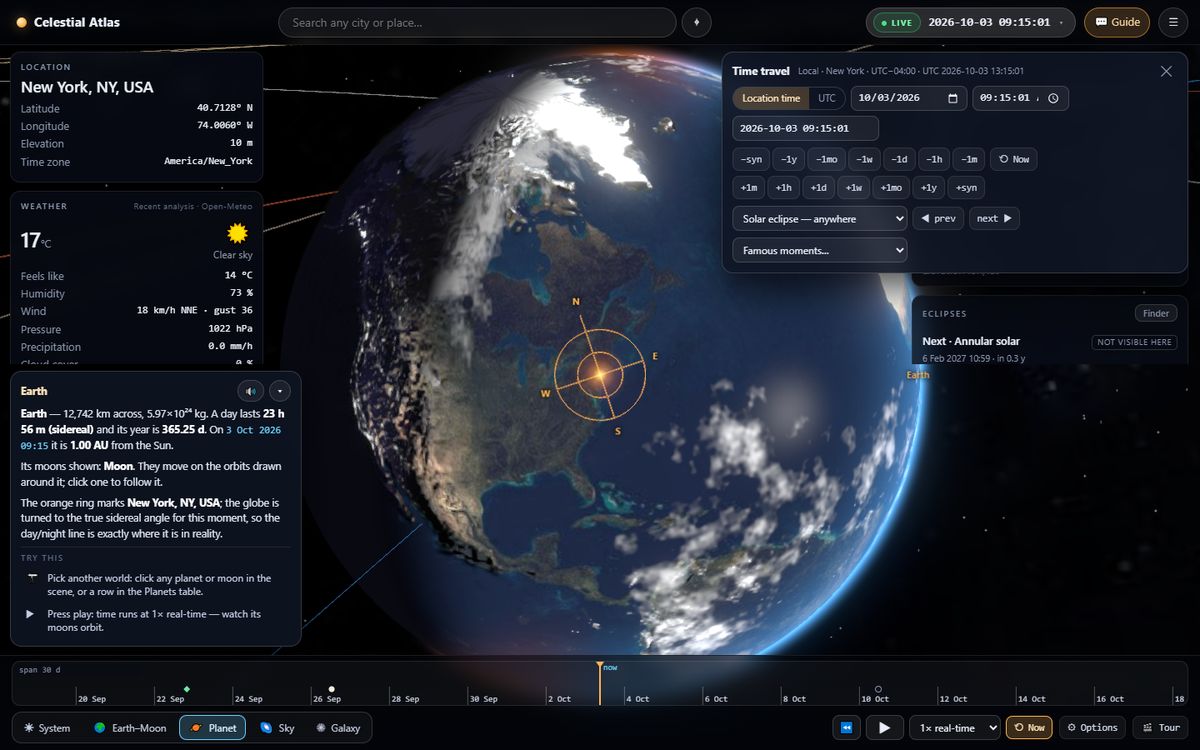
How to travel in time
Click the clock at the top right. You can edit the date and time fields, type an ISO date such as 1969-07-20 20:17:00 (add Z for UTC), use the step chips (±minute, hour, day, week, month, year or one synodic month of 29.53 days), or press play and choose a speed from real-time to one year per second. The timeline at the bottom shows the next month by default and zooms from a day to 500 years; dots mark eclipses, Moon phases and the equinoxes and solstices.
Event jumps take you to the next or previous solar or lunar eclipse (anywhere, or visible from your place), New/Full/quarter Moon, equinoxes and solstices, Earth's perihelion and aphelion, planetary oppositions, conjunctions and greatest elongations, and peak dates of major meteor showers (approximate).
Time zones, daylight saving and old calendars
Local time uses the place's current IANA time-zone rules. If you type a wall-clock time that does not exist (the hour skipped when clocks spring forward) the atlas moves it to the next valid time and tells you; if a time occurs twice (clocks falling back) it picks the first occurrence. Before 1970 the atlas shows the UTC offset marked with an asterisk, because historical civil time in a place may have differed from today's rules. Internally everything runs on UTC and the Julian day.
The atlas uses the proleptic Gregorian calendar throughout (as JavaScript dates do), so a date before 15 October 1582 is a Gregorian date, not the Julian-calendar date people used then. The built-in self-test checks these calendar edge cases and leap years.
How accurate is it?
| Body | Largest error vs JPL Horizons (topocentric, 1969–2026) |
|---|---|
| Sun | 1.2 arcseconds |
| Moon | 4.4 arcseconds |
| Planets | 5 arcseconds |
Between 1700 and 2200 CE no warning is shown. From 1000 to 1700 and 2200 to 3000 the atlas displays a reduced accuracy banner because the underlying analytic theories drift (the Moon's position can be about 15 arcminutes off by 2500 CE). The ΔT correction, which accounts for Earth's irregular rotation, is itself uncertain in the far past and future, so exact eclipse timing before about 1600 or after 2100 is approximate. Dates outside 1000–3000 are rejected with an explanation.
Famous moments you can jump to
- Apollo 11 landing — 20 July 1969, 20:17 UTC, the sky as seen from your location.
- Eddington's eclipse — 29 May 1919 at Príncipe, the eclipse used to test general relativity.
- Total solar eclipses — 21 Aug 2017 (Carbondale, Illinois), 8 Apr 2024 (Dallas), 12 Aug 2026 (Spain), 2 Aug 2027 (Luxor).
- Lunar eclipses — total 7 Sep 2025 and partial 28 Aug 2026.
- Birth sky — enter a birth date to see the sky over a place that day.
Frequently asked questions
What dates does Celestial Atlas support?
Any moment from the year 1000 to the year 3000 CE. Outside 1700–2200 CE a reduced-accuracy banner appears, and dates outside 1000–3000 are rejected.
How do I see the sky on my birthday?
Open the time-travel panel, choose “My birth sky / a birthday…” under Famous moments, enter the date and time, and the atlas opens the Sky view for your selected place.
Does it handle daylight saving time?
Yes. It uses the IANA time-zone rules for the selected place, moves non-existent spring-forward times to the next valid time and resolves repeated autumn times to the first occurrence.