Celestial Atlas › Learn › Interactive 3D solar system: planets, moons and orbits
Interactive 3D solar system: planets, moons and orbits
Celestial Atlas draws the Sun, the eight planets, Pluto and more than twenty moons at the positions they really occupy on the date you choose (any moment from 1000 to 3000 CE). Looking down on the ecliptic you can click any world, fly to it, switch to true scale, or follow the Moon around Earth.
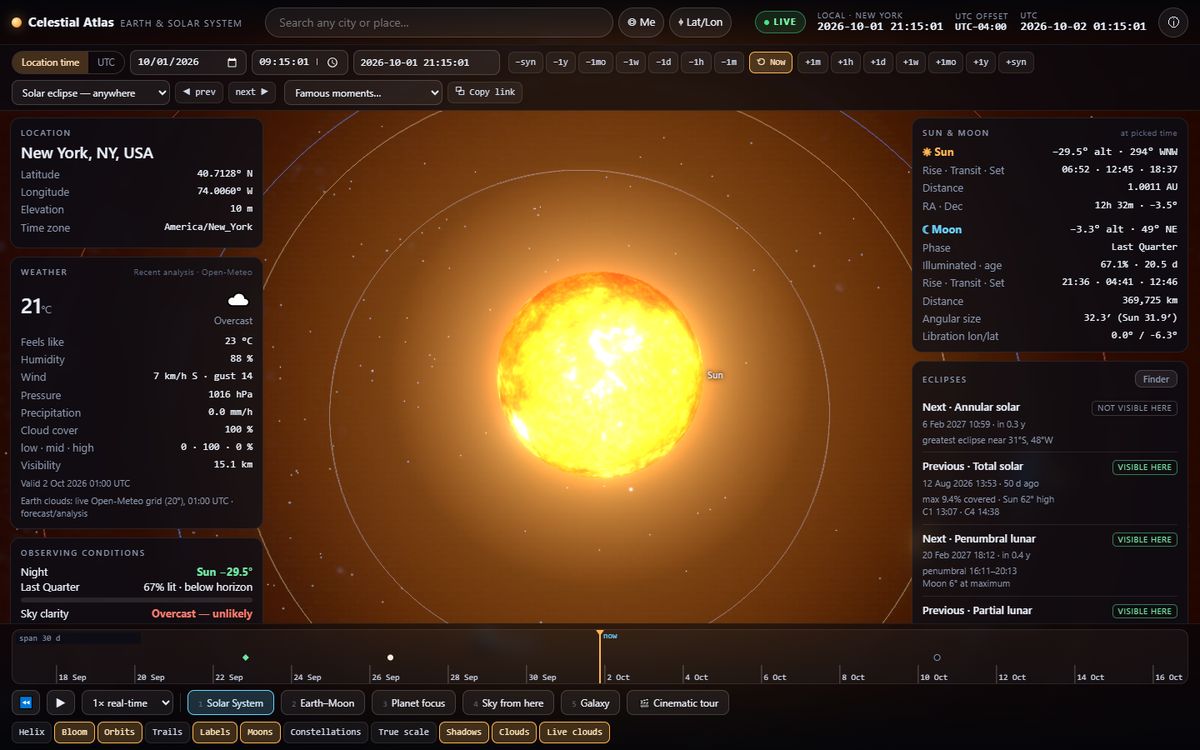
What you are looking at
The default view looks down on the ecliptic, the plane of Earth's orbit. The Sun sits at the centre; each planet is placed where it is on the selected date, computed from the standard series that professional almanacs use. The thin lines are orbits; the labelled dots are the bodies. Click a planet to see its diameter, mass, day length, year length and distance from the Sun and Earth; double-click to fly to it.
The Moon and the planets' moons are drawn around their parents. When you are far away the moon systems are drawn compact so that, for example, the Moon's orbit does not appear to cross Venus or Mars; as you fly in they open out to their true relative size.
The planets at a glance
| Body | Diameter | Orbit (semi-major axis) | Year | Day |
|---|---|---|---|---|
| Mercury | 4,879 km | 0.387 AU | 88 days | 58.6 days |
| Venus | 12,104 km | 0.723 AU | 224.7 days | 243 days (retrograde) |
| Earth | 12,742 km | 1.000 AU | 365.25 days | 23 h 56 min (sidereal) |
| Mars | 6,779 km | 1.524 AU | 687 days | 24 h 37 min |
| Jupiter | 139,822 km | 5.203 AU | 11.86 years | 9 h 56 min |
| Saturn | 116,464 km | 9.537 AU | 29.46 years | 10 h 33 min |
| Uranus | 50,724 km | 19.19 AU | 84.0 years | 17 h 14 min (retrograde) |
| Neptune | 49,244 km | 30.07 AU | 164.8 years | 16 h 6 min |
One astronomical unit (AU) is the average Earth–Sun distance, about 149.6 million km. Light takes about 8 minutes 20 seconds to cross it.
Why there is a True scale switch
A picture of the solar system that is both to scale and visible does not exist: if the Sun were a 1 cm ball, Earth would be a 0.1 mm speck 1.1 m away and Neptune 33 m away. The default view therefore enlarges the bodies so you can see them. True scale shows 1 scene unit = 1,000 km: planets shrink to specks and the emptiness of space becomes obvious. The atlas labels which mode you are in.
Moons
Earth's Moon, the four Galilean moons of Jupiter (Io, Europa, Ganymede, Callisto), and 14 more moons of Mars, Saturn, Uranus and Neptune are drawn on their real orbits. Jupiter's moons come from Astronomy Engine's dedicated model; the others use mean orbital elements published by NASA/JPL, which is accurate enough for visuals but not for precise phenomena such as mutual eclipses.
Moons also cast and receive shadows: Io's shadow can cross Jupiter's cloud tops, and Saturn's rings and globe shadow one another.
What is real and what is illustrative
- Real Positions and orbital motion of the Sun, planets, Moon and the listed moons.
- Real Axial tilts and rotation phases (IAU models), so Earth is turned to its true orientation.
- Illustrative Sizes in explorable mode, the compact moon systems at long range, and the textures (NASA-derived maps).
Frequently asked questions
How accurate are the planet positions?
Against NASA/JPL Horizons the atlas agrees to about 1.2 arcseconds for the Sun, 4.4 arcseconds for the Moon and 5 arcseconds for the planets between 1969 and 2026. Accuracy degrades gradually before 1700 and after 2200 CE.
Can I see the solar system to scale?
Yes. Turn on True scale in Options: bodies are drawn at their real size and distance (1 unit = 1,000 km), so planets become tiny specks in a mostly empty space.
Are Pluto and the moons included?
Yes. Pluto is shown with the planets, and the Moon, the four Galilean moons and 14 other moons of Mars, Saturn, Uranus and Neptune are drawn on their orbits.